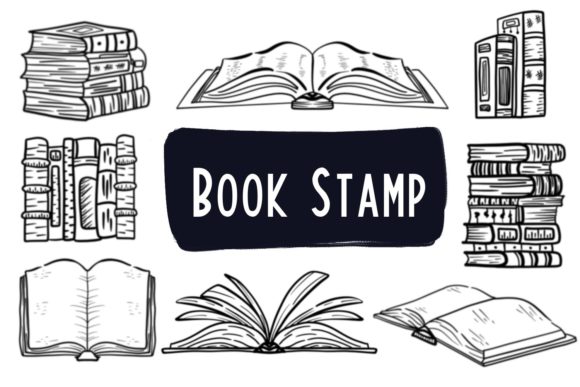
Elevating Digital Art with Book Shape Procreate Brush Stamps
In the rapidly evolving landscape of digital illustration, the tools an artist chooses can define the texture, depth, and personality of their work. Among the myriad of resources available to iPad users, the Book Shape Procreate Brush Stamps have emerged as a specialized asset for creators looking to infuse a literary and handcrafted aesthetic into their projects. Unlike standard geometric shapes or generic textures, these brush stamps are designed to mimic the organic feel of hand-drawn books, offering a unique way to decorate digital canvases, design physical products, and enhance branding materials.
This article explores the utility, features, and practical applications of this specific brush set, helping you determine if it aligns with your creative workflow and project requirements.
The Essence of Hand-Drawn Digital Assets
The core appeal of the Book Shape Procreate Brush Stamps lies in their origin. These are not computer-generated vectors with perfect, sterile lines. Instead, they are hand-drawn and meticulously designed to retain the imperfections and charm of traditional ink on paper. When applied within the Procreate app, each stamp carries the nuance of a human touch, which is increasingly valuable in a world saturated with AI-generated imagery and flawless digital gradients.
For professionals and hobbyists alike, incorporating these elements can bridge the gap between digital efficiency and analog warmth. Whether you are designing a logo for a bookstore, creating wedding stationery with a vintage theme, or simply adding a decorative border to a social media post, the organic nature of these brushes adds a layer of sophistication that pre-made clip art often lacks.
Versatility Across Mediums
One of the most significant advantages of this digital file is its adaptability. While the brushes function natively within the Procreate ecosystem on an iPad, the artwork created with them transcends the screen. Because the output is high-resolution raster data (depending on your canvas settings), the designs generated with the Book Stamp brushset can be exported and utilized across a vast array of physical and digital mediums.
Consider the following applications where these stamps excel:
- Mug and T-Shirt Design: The distinct outlines of the book shapes make for excellent print-on-demand graphics. They stand out clearly against fabric and ceramic surfaces.
- Greeting Cards and Stationery: Perfect for crafting personalized invitations, thank-you notes, or holiday cards where a literary theme is desired.
- Packaging and Tags: Small business owners can use these stamps to create unique branding elements for product packaging, hang tags, or stickers.
- Wall Art and Home Decor: Artists can compose intricate illustrations featuring stacks of books or library scenes to be printed as large-scale wall art.
- Digital Content: Beyond print, these assets are ideal for blog headers, eBook covers, and social media graphics.
Technical Requirements and Compatibility
Before integrating the Book Shape Procreate Brush Stamps into your toolkit, it is crucial to understand the technical environment required to utilize them effectively. This is a specialized tool built specifically for the Apple ecosystem.
To use this brush set, you must have:
- An iPad Pro (or a compatible iPad model that supports the full version of Procreate).
- The Procreate app installed and updated.
- A pressure-sensitive stylus, specifically the Apple Pencil.
It is important to note a critical limitation: this brush set is not suitable for Photoshop or any other computer-based software. The file format (.brushset) is proprietary to Procreate. Attempting to import these files into Adobe Photoshop, Illustrator, or desktop painting programs will not work. Furthermore, while some styluses mimic the Apple Pencil, the pressure sensitivity and tilt recognition required to get the best performance from these hand-drawn stamps are optimized for the official Apple hardware.
What Is Included in the Download?
When you acquire this resource, you are purchasing an instant download of a digital file. There is no physical item shipped to your address. The package typically consists of a single .zip file. Once extracted, you will find a .brushset file containing 8 unique book stamps.
Upon importing this file into Procreate, all eight brushes appear instantly in your brush library. A key feature of this purchase is that the files are delivered without watermarks or shadows. This ensures that when you create your final composition, the edges are clean, and the design is ready for professional export. The absence of pre-baked shadows gives you, the creator, full control over lighting and depth, allowing you to add your own shadows manually if the project demands it.
Practical Workflows for Creators
How does one actually integrate these stamps into a daily workflow? The process is straightforward but offers room for creative experimentation. After importing the .brushset file by tapping it on your iPad, the brushes become available in your Procreate brush panel.
Scenario 1: The Freelance Illustrator
A freelancer tasked with illustrating a children's book about a library can use the Book Shape Procreate Brush Stamps to quickly populate background shelves. Instead of drawing every single book spine individually, they can stamp various shapes, rotate them, and recolor them to create a bustling, detailed library scene in a fraction of the time.
Scenario 2: The Small Business Owner
An entrepreneur selling handmade candles wants to create a "Reader's Edition" label. They can open Procreate, select a book stamp, write a custom quote over it using a complementary font brush, and export the image as a PNG with a transparent background. This file is then sent directly to a sticker printer or label manufacturer.
Scenario 3: The Social Media Manager
For content creators focusing on "BookTok" or literary Instagram accounts, these stamps serve as excellent decorative elements. They can be used to frame text overlays, create bullet points for reading lists, or add a thematic flair to story highlights.
Evaluating Suitability for Your Needs
While the Book Stamp brushset is a powerful tool, it is not a one-size-fits-all solution. Before downloading, consider your current setup and project goals.
If you primarily work on a desktop computer using Windows or macOS with a Wacom tablet and Photoshop, this product will not be usable for you without first transferring your workflow to an iPad. Additionally, if your design style relies heavily on hyper-realistic 3D rendering or vector-based scalability for massive billboards, raster-based Procreate brushes might require extra steps (like vectorizing in Illustrator later) to meet those specific resolution needs.
However, for those who already reside in the Procreate ecosystem, the value proposition is high. The time saved by using pre-drawn, high-quality stamps versus sketching complex book shapes from scratch allows artists to focus on composition, color theory, and storytelling. The hand-drawn nature ensures that even when used repeatedly, the designs do not look robotic, provided the user varies the size, rotation, and color of the stamps.
Final Thoughts on Digital Efficiency
The Book Shape Procreate Brush Stamps represent a convergence of artistic tradition and modern convenience. They allow creators to maintain the aesthetic of hand-crafted illustration while leveraging the speed and editability of digital tools. Whether you are jazzing up your workspace with custom wall art, designing a new line of merchandise, or crafting the perfect wedding invitation, these brushes offer a reliable and charming solution.
Remember, the true power of these tools lies not just in the files themselves, but in how you manipulate them. By understanding the limitations—specifically the requirement for iPad and Apple Pencil—and embracing the versatility of the output, you can unlock a new dimension of creativity in your digital art journey. Always ensure your software is up to date to guarantee smooth performance, and enjoy the process of turning simple stamps into intricate, meaningful designs.