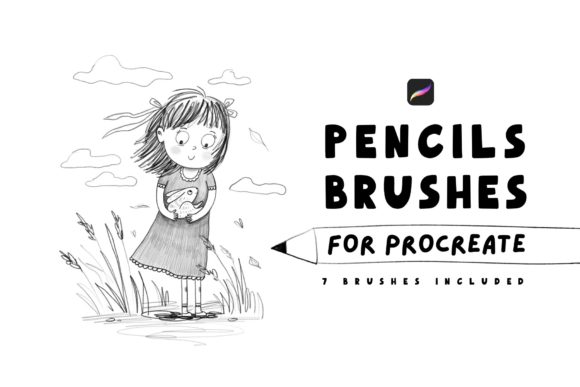
Master Realism: 7 Essential Pencils for Procreate
Digital art often struggles to capture the gritty, organic texture of traditional media. You can spend hours layering colors and adjusting opacity, yet the result still feels too smooth, too perfect, and ultimately lifeless. This is where Pencils for Procreate changes the workflow entirely. By integrating a specialized set of seven pencil brushes designed specifically for high-fidelity rendering, artists can bridge the gap between screen and paper. These tools are not just another download; they are a precision instrument kit that allows you to create amazing realistic illustrations with a level of depth that standard software defaults simply cannot match.
To get started, the barrier to entry is refreshingly low. You will need an iPad and Procreate 5 version or higher. Once your device is ready, the installation process is seamless. You will receive the 7 pencils Procreate brushes in a convenient .brushset format. A single tap imports the entire collection into your library, allowing you to jump straight into your canvas. There is no complex configuration or tedious setup required. Just start creating.
Why Texture Matters in Digital Illustration
The difference between a good digital drawing and a great one often lies in the subtle imperfections of the medium. Traditional graphite leaves grain, varies in pressure sensitivity, and interacts with the tooth of the paper. Replicating this digitally requires more than just a textured overlay; it demands brushes that respond dynamically to your stylus movements.
This specific collection of Pencils for Procreate addresses those nuances. Each of the seven brushes serves a distinct purpose in the rendering pipeline. Some are engineered for soft, broad shading that mimics a dull 4B pencil, while others offer the sharp, precise line work of a mechanical 0.3mm lead. This variety ensures that you aren't forced to compromise on detail. Whether you are sketching the fine pores on a portrait or rendering the rough bark of an oak tree, these brushes provide the necessary range to build up value and form realistically.
Key Characteristics of the Brush Set
What sets this pack apart is the attention paid to pressure curves and grain flow. In many generic brush sets, the texture repeats visibly as you stroke, breaking the illusion of reality. Here, the algorithms within the brushes scatter the graphite particles naturally, preventing repetitive patterns.
- Dynamic Opacity: The brushes react instantly to Apple Pencil pressure, allowing for smooth transitions from faint guidelines to deep, dark shadows without lifting your hand.
- Authentic Grain: Each brush includes a unique paper grain simulation that interacts with the underlying canvas texture, adding a tactile quality to every stroke.
- Blending Capabilities: Several pencils in the set are optimized for smudging and blending, letting you soften edges directly without switching to a separate smear tool.
- Stabilization: Built-in streamlining helps maintain clean lines during slow, deliberate strokes, which is crucial for technical illustration and architectural sketching.
Practical Applications Across Industries
The utility of these tools extends far beyond hobbyist sketching. For professionals, time is money, and the efficiency gained by having the right tool for the job is invaluable.
Concept Artists and Game Designers often need to iterate quickly. Using these pencils, a designer can produce concept sheets that look like finished traditional sketches, conveying mood and materiality to clients faster than a flat color block ever could. The realistic texture helps stakeholders visualize the final product more effectively.
Educators and Tutorial Creators will find these brushes indispensable for teaching fundamentals. When demonstrating light and shadow or perspective, the ability to mimic real-world drawing materials helps students grasp concepts more intuitively. It removes the "digital crutch" and forces a focus on core artistic principles.
Marketers and Content Creators looking to stand out in a saturated feed can use these illustrations to add a human touch to their branding. In an era of polished vector graphics and AI-generated images, hand-drawn realism signals authenticity and craftsmanship. A blog post featuring a custom, realistically shaded illustration created with Pencils for Procreate engages readers differently than a stock photo, fostering a deeper emotional connection.
Enhancing Productivity and Workflow
Adopting this brush set isn't just about aesthetics; it's about workflow optimization. When you trust your tools, you stop fighting the software and start focusing on the art. Because these seven brushes cover the entire spectrum of pencil work—from initial roughs to final polish—you rarely need to leave your current layer setup to hunt for a different tool.
Consider the process of portraiture. Traditionally, an artist might switch between three different physical pencils and a blending stump. With this digital set, those actions are mapped to intuitive gestures or quick menu selections. You can hatch shadows, blend skin tones, and add hair details with a fluidity that keeps you in the "flow state." This reduction in friction leads to higher output and less fatigue during long sessions.
Making the Most of Your New Tools
While the brushes are powerful out of the box, getting the best results requires a bit of experimentation. Every artist holds their iPad and Apple Pencil differently. Take ten minutes upon importing the .brushset file to test each of the seven pencils on a scrap canvas. Pay attention to how the grain reacts at 10% pressure versus 90%.
It is also recommended to pair these brushes with a matte screen protector. While not strictly necessary, a paper-like surface enhances the tactile feedback, making the digital experience feel even closer to drawing on sketchbook paper. This physical change, combined with the digital fidelity of Pencils for Procreate, creates a synergistic effect that elevates the entire drawing experience.
Remember, the goal is not to perfectly replicate tradition but to leverage its strengths within a modern framework. Use the softer brushes for atmospheric backgrounds and the harder tips for intricate foreground details. Layer them. Erase with them. Treat them as living tools that adapt to your style rather than rigid presets.
Final Thoughts on Digital Realism
The evolution of digital art has reached a point where the medium is no longer a limitation but a vast playground for realism. With the right assets, the iPad becomes a studio capable of producing work indistinguishable from traditional masterpieces. These seven pencils are a testament to that potential. They offer a straightforward path to achieving depth, texture, and emotion in your work.
Whether you are a freelancer pitching to a new client, an entrepreneur designing a logo, or a hobbyist filling a sketchbook, the quality of your tools dictates the ceiling of your output. By integrating these specialized brushes into your arsenal, you equip yourself to create amazing realistic illustrations that resonate with viewers. The setup is simple, the learning curve is gentle, and the results are professional-grade. Enjoy the process, experiment freely, and watch your digital drawings come to life with a newfound sense of reality.