Unlocking Creative Workflows with the Coloring Constructor for Procreate
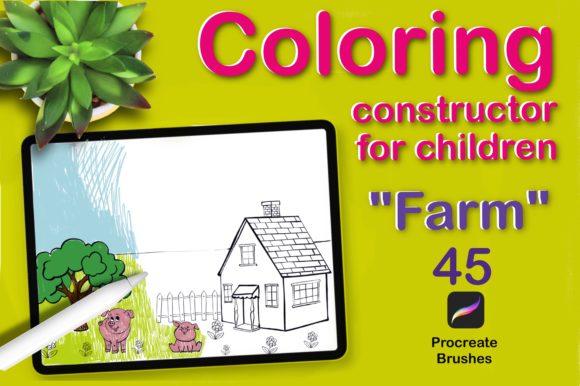
In the evolving landscape of digital illustration, efficiency often dictates the quality of output. For professionals ranging from graphic designers to educators, the ability to generate consistent, high-quality visual assets quickly is a critical skill. The Coloring Constructor for Procreate emerges as a specialized toolset designed to bridge the gap between complex manual drawing and rapid asset generation. Specifically tailored for creating farm-themed illustrations, this collection of 45 brushes offers a modular approach to building scenes, making it a valuable resource for those who need to produce engaging content without starting from a blank canvas every time.
This article evaluates the practical utility of the Coloring Constructor, analyzing its components, workflow integration, and suitability for various professional and educational applications. By breaking down its features—ranging from stamp brushes for animals and structures to texture tools for nature elements—we can determine whether this asset pack aligns with your specific creative goals.
Deconstructing the Asset Pack: Components and Functionality
The core value of the Coloring Constructor for Procreate lies in its categorization. Rather than offering a random assortment of textures, the 45 brushes are organized into logical groups that mimic the layers of a physical scene. This structure allows users to build illustrations systematically, ensuring coherence in style and perspective.
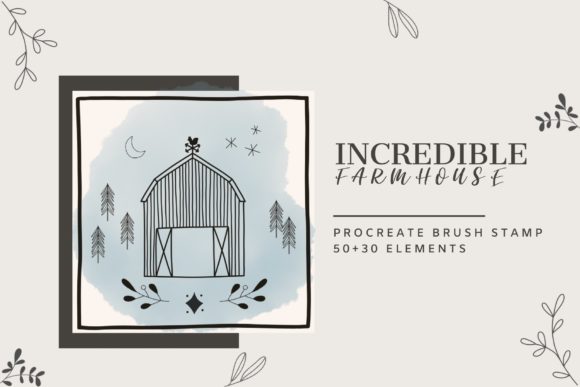
The first category includes stamp brushes featuring essential farm elements. This set covers a wide array of subjects including domestic animals, vegetables, fruits, houses, trees, and even specific machinery like tractors. For a marketer or blogger needing to illustrate an article about sustainable agriculture or rural living, these stamps provide immediate visual anchors. Instead of sourcing stock photos or commissioning custom vector art, a user can place a tractor or a barn directly onto the canvas with a single tap. The inclusion of atmospheric elements like rain, sun, and clouds further enhances the ability to set a mood or context instantly.
The second group focuses on environmental grounding, comprising grass brushes, fences, plants, and chains. These tools are crucial for connecting the disparate stamped elements into a unified scene. A common pitfall in digital collage is the "floating object" effect, where items look pasted rather than integrated. The specialized grass and plant brushes in this constructor allow for seamless blending, enabling the creator to grow vegetation around the base of a house or weave a fence through a field naturally. The chain brush adds a unique utility for creating boundaries or decorative borders, adding a layer of detail that often separates amateur work from professional-grade illustrations.
Finally, the set includes three distinct rendering brushes: markers, watercolors, and pencils. These are not merely for coloring within the lines but serve as texturing tools to unify the aesthetic. Whether the goal is a vibrant, saturated look typical of children's books or a softer, muted tone suitable for lifestyle branding, these brushes provide the necessary finish. They allow the user to add hand-drawn nuances to the stamped elements, ensuring the final image retains an organic feel despite being constructed from pre-made assets.
Workflow Efficiency and Practical Application
For freelancers and small business owners, time is a non-renewable resource. The primary strength of the Coloring Constructor for Procreate is its ability to accelerate the ideation and execution phases of a project. Consider an educator developing materials for a unit on farming. Traditionally, creating a series of consistent images showing different stages of crop growth or various farm animals would require hours of drawing or expensive licensing fees. With this toolset, the educator can assemble a cohesive visual narrative in minutes.
The modularity of the brushes supports rapid iteration. A designer can test multiple compositions by swapping out a tree type or moving a barn location without redrawing the entire background. This flexibility is particularly beneficial during client presentations or when A/B testing visuals for social media campaigns. The ability to quickly generate "many options for coloring illustration," as the tool promises, means that creators can present stakeholders with varied concepts before committing to a final render.
Moreover, the consistency of the brush strokes ensures that all elements share a common visual language. In branding and publishing, maintaining a consistent style across different pieces of content is vital for recognition. Because all 45 brushes are designed to work together, the resulting illustrations avoid the disjointed look that often occurs when mixing assets from different sources. The line weights, textures, and color palettes are inherently harmonized, reducing the need for post-production adjustments.
Evaluating Quality and Usability for Diverse Audiences
While the tool is marketed with a focus on children's creativity, its utility extends significantly into professional spheres. The simplicity of the interface—leveraging Procreate's intuitive brush engine—makes it accessible to users with varying levels of technical proficiency. However, the depth of the asset library ensures that it does not feel limiting to experienced artists.
For Educators and Publishers: The farm theme is universally recognizable and highly effective for teaching concepts related to biology, geography, and sustainability. The inclusion of vegetables, fruits, and animals provides a comprehensive vocabulary of images. The reliability of the stamps means that teachers can create worksheets, flashcards, and presentation slides that look polished and engaging. The "coloring" aspect also allows for the creation of interactive activities where students can digitally color the scenes, fostering engagement in remote learning environments.
For Marketers and Content Creators: In the age of visual storytelling, unique illustrations often perform better than generic stock photography. The Coloring Constructor allows bloggers and marketers to create bespoke imagery that aligns perfectly with their brand voice. For instance, a blog post about organic eating can be illustrated with custom arrangements of the fruit and vegetable stamps, colored with the provided watercolor brushes to evoke freshness and natural quality. This level of customization helps content stand out in crowded feeds.
For Hobbyists and Parents: On a personal level, the tool serves as an excellent medium for family projects. It lowers the barrier to entry for digital art, allowing children to express their imagination without being hindered by a lack of drawing skills. Parents can guide their children in constructing scenes, teaching composition and color theory in a fun, low-pressure environment. The variety of options ensures that the activity remains fresh; one day the focus might be on building a rainy day scene with clouds and tractors, and the next on a sunny harvest with fruits and fences.
Limitations and Strategic Considerations
Despite its strengths, the Coloring Constructor for Procreate is a specialized tool with specific constraints. Its thematic focus on farms limits its applicability to projects outside this niche. A designer working on urban architecture or futuristic sci-fi concepts will find little use for tractors and barns. Therefore, potential users must evaluate their current and future project pipelines to ensure the investment yields a return. It is best viewed as a targeted solution rather than a general-purpose illustration kit.
Additionally, while the stamp brushes offer speed, overreliance on them can lead to repetitive visuals if not managed carefully. Professional users should leverage the rendering brushes (markers, watercolors, pencils) to modify and customize the stamped elements. Adding hand-painted shadows, highlights, or texture overlays can differentiate one illustration from another, preventing the "cookie-cutter" look that can arise from using stamp sets exclusively. The true power of the tool lies in the hybrid approach: using stamps for structure and traditional digital painting techniques for soul and detail.
Compatibility is another factor to consider. As a Procreate-specific asset, it requires an iPad and the Procreate app. Users entrenched in Adobe Illustrator or Photoshop workflows may find the transition inconvenient, although the raster nature of the brushes makes them difficult to replicate vectorially without significant effort. For those already within the Apple ecosystem, however, the integration is seamless.
Final Verdict on Long-Term Value
The Coloring Constructor for Procreate represents a pragmatic addition to a digital artist's toolkit. It solves a specific problem—how to create high-volume, consistent, farm-themed illustrations efficiently—with a well-organized and versatile set of 45 brushes. Its value is not just in the individual assets but in the workflow optimization it provides. By reducing the time spent on drafting basic elements, creators can focus more on composition, storytelling, and refinement.
For professionals seeking to streamline their content production, educators looking for engaging visual aids, or families wanting to explore digital creativity together, this tool offers a balanced mix of convenience and artistic potential. While its thematic scope is narrow, within that scope, it delivers high reliability and flexibility. When used with a strategic eye for customization, it enables the production of distinctive, high-quality illustrations that resonate with audiences and meet professional standards. Ultimately, it is a testament to how specialized digital assets can empower creators to work smarter, turning complex illustration tasks into manageable, enjoyable processes.