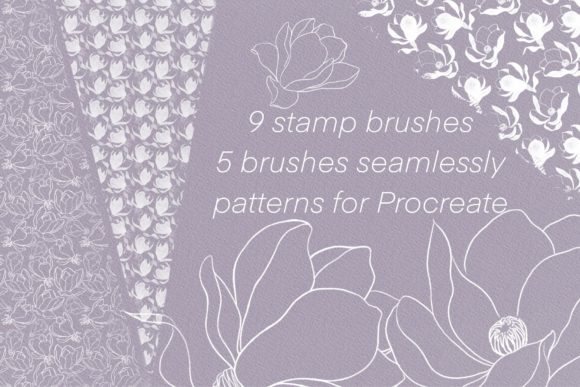
Elevate Your Art with the Magnolia Brush Set for Procreate
Digital illustration often hinges on texture. A flat, vector-like finish can feel sterile, while the right stroke adds soul, depth, and a tangible quality that draws viewers in. For iPad artists seeking that perfect balance between organic charm and digital precision, the Magnolia Brush Set for Procreate offers a specialized toolkit designed to transform standard drawings into rich, layered compositions. This isn't just another generic pack of ink pens; it is a curated collection focused on decorative elements, seamless patterns, and stitching details that serve as powerful auxiliary tools for your creative workflow.
Whether you are a freelance illustrator building a portfolio, a small business owner designing product packaging, or a hobbyist journaling your daily life, integrating high-quality stamp and pattern brushes can drastically reduce production time while elevating the final aesthetic. The Magnolia set stands out because it addresses specific needs—decoration and texture—that many broader brush packs overlook.
A Closer Look at the Toolkit
The core strength of this collection lies in its focused composition. Rather than overwhelming you with hundreds of redundant options, the Magnolia Brush Set for Procreate provides nine distinct stamp brushes, five seamless pattern brushes, and a dedicated selection of stitch brushes. Each category serves a unique function in the illustration process.
The nine stamp brushes act as your quick-decoration arsenal. These are pre-designed elements that you can place onto your canvas with a single tap. Think of them as digital stickers that blend naturally with your hand-drawn lines. They are ideal for adding floral accents, abstract shapes, or textural noise without needing to paint every petal or dot manually. Because they are optimized for Procreate, they respond to pressure and tilt, ensuring they don't look like pasted-on clip art but rather an integrated part of your artwork.
Complementing the stamps are the five seamless pattern brushes. These are game-changers for background work and surface design. When you drag these across the canvas, they create a continuous, repeating motif that tiles perfectly. This eliminates the tedious task of copying, pasting, and aligning pattern blocks manually. Whether you need a subtle paper grain, a geometric grid, or a botanical repeat for a textile design, these brushes generate complex backgrounds in seconds.
Finally, the stitch brushes add a tactile, handcrafted dimension to digital pieces. In an era where digital art can sometimes feel too smooth, simulating embroidery or hand-sewn details introduces a cozy, artisanal vibe. These brushes allow you to outline characters, frame text, or highlight specific areas with a dashed, thread-like effect that mimics real fabric work.
Real-World Applications for Creators
The versatility of the Magnolia Brush Set for Procreate extends far beyond simple sketching. Its utility shines brightest when applied to professional projects where efficiency and branding are paramount.
Branding and Product Design
For entrepreneurs and marketers, consistency is key. If you are designing labels for a boutique candle line or packaging for handmade soaps, the seamless pattern brushes allow you to create custom wrapping paper designs directly within Procreate. You can test different colorways instantly. The stamp brushes work exceptionally well for creating unique icons or decorative dividers for your website and social media graphics, giving your brand a cohesive, hand-lettered feel without hiring a separate graphic designer for every asset.
Greeting Cards and Stationery
The stationery market thrives on charm and detail. Using the stitch brushes, you can simulate the look of embroidered greeting cards, a style that commands a premium price point on platforms like Etsy. The ability to quickly decorate the borders of a card with floral stamps means you can produce a series of variations for a collection in a fraction of the time it would take to draw them individually. This efficiency allows creators to scale their output during peak seasons like holidays or Valentine's Day.
Educational Materials and Planning
Educators and content creators can leverage these tools to make learning materials more engaging. Worksheets, digital planners, and presentation slides often benefit from soft, organic textures that reduce visual fatigue. The seamless patterns provide excellent backgrounds that are interesting but not distracting, while the stamp brushes can be used to create reward charts, decorative bullet points, or thematic headers that make dry information feel inviting.
Why Efficiency Matters in Digital Art
One of the most significant benefits of adopting the Magnolia Brush Set for Procreate is the boost in productivity. In a professional setting, time is money. Spending hours painting repetitive background motifs or hand-drawing dozens of tiny flowers is rarely the best use of an illustrator's skills. By utilizing high-quality stamps and patterns, you offload the repetitive tasks to the software, freeing up your mental energy for composition, color theory, and storytelling.
This approach does not compromise originality. Because these brushes are auxiliary elements, they support your main subject rather than replacing it. You maintain full control over placement, rotation, opacity, and blending modes. You might use a stamp as a base and then paint over it to integrate it further, or combine two different pattern brushes to create a wholly new texture. The tool accelerates the process, but the artistic vision remains entirely yours.
Tips for Maximizing Your Results
To get the most out of this brush set, consider how you layer and blend these elements. Digital art offers non-destructive editing capabilities that traditional media cannot match.
- Experiment with Blending Modes: Don't just leave your pattern brushes on "Normal." Try setting them to "Multiply" for a stamped ink look, "Overlay" for subtle texture, or "Soft Light" to warm up a background. This integration makes the brush strokes feel like part of the paper rather than sitting on top of it.
- Vary Opacity and Size: Avoid using stamps at 100% opacity repeatedly, as this can create a rigid, digital pattern. Lower the opacity for a faded, vintage aesthetic, or rotate the stamps slightly to mimic natural variation.
- Combine with Hand-Drawn Elements: Use the stitch brushes to outline your hand-drawn characters. This juxtaposition of loose sketching and precise "thread" creates a dynamic contrast that catches the eye.
- Create Custom Palettes: Before starting, define a limited color palette. Apply your pattern brushes using these specific colors to ensure the decorative elements harmonize with your main illustration rather than clashing.
Making the Right Choice for Your Workflow
When evaluating whether the Magnolia Brush Set for Procreate fits your needs, consider your current bottlenecks. If you find yourself stuck on backgrounds or wishing your illustrations had more textural depth, this set is a strategic investment. It is particularly valuable for those who work in styles ranging from boho and whimsical to modern minimalist, where clean lines meet organic textures.
However, remember that brushes are tools, not magic wands. They work best when you have a fundamental understanding of composition and light. Use them to enhance your existing skills, not to mask a lack of foundational practice. The best results come when the artist's intent guides the tool, not the other way around.
In the competitive landscape of digital creativity, having a reliable set of decorative assets can be the difference between a good piece and a great one. The Magnolia Brush Set for Procreate offers a practical, efficient, and aesthetically pleasing way to add that final layer of polish. By streamlining your decoration process and introducing high-quality textures, it empowers you to focus on what truly matters: telling your story through art.