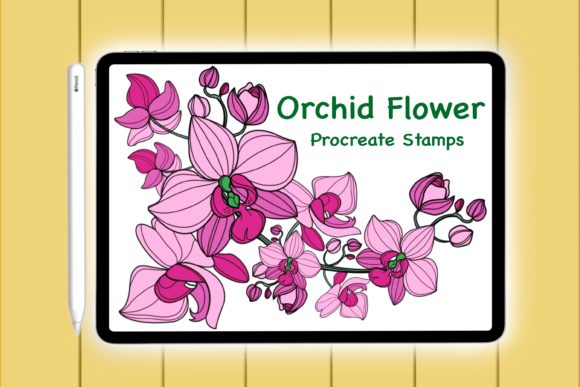
Elevate Your Art with the Procreate Orchid Floral Doodle Brush
In the fast-paced world of digital design, finding tools that balance efficiency with artistic integrity can be a challenge. Whether you are a seasoned graphic designer, a small business owner creating your own marketing materials, or a hobbyist looking to elevate your digital journaling, the right assets make all the difference. The Procreate Orchid Floral Doodle Brush set offers a specialized solution for creators who want to infuse their projects with organic elegance without spending hours hand-drawing every petal. This isn't just a collection of images; it is a functional stamp brush set designed to streamline your workflow while maintaining a handmade aesthetic.
At its core, this digital asset is an instant download package tailored specifically for the iPad ecosystem. Once payment is processed, you receive a zip file containing everything needed to get started immediately. The set includes four distinct orchid stamp brushes, a comprehensive instruction guide for installation, and a ReadMe file to ensure you understand the licensing and usage terms. Because these are digital stamps, they function differently than standard painting brushes. Instead of dragging your stylus across the canvas to create a stroke, you simply select the brush and tap the screen. This action places a pre-rendered, high-quality orchid illustration exactly where you need it. The result is immediate consistency and speed, allowing you to focus on composition rather than repetition.
Why Choose Digital Stamps for Your Workflow?
The primary advantage of using a stamp brush set like this lies in its ability to save time without sacrificing quality. For professionals working on tight deadlines, such as wedding invitation designers or social media managers, the ability to drop in a perfectly rendered floral element in seconds is invaluable. Traditional methods might require sketching, inking, coloring, and shading each flower individually. With the Procreate Orchid Floral Doodle Brush, that process is condensed into a single tap.
Furthermore, these stamps come with transparent backgrounds. This technical detail is crucial for versatility. It means you can layer these orchids over textured papers, solid colors, photographs, or complex patterns without unsightly white boxes surrounding the flowers. You have full control to adjust the opacity, change the color using Procreate's adjustment tools, or apply blending modes to make the florals integrate seamlessly into any background. This flexibility ensures that your final output looks custom-made, even when using pre-designed elements.
Practical Applications Across Industries
The utility of this brush set extends far beyond simple digital sketches. Its applications span various sectors, proving its worth for entrepreneurs, educators, and creatives alike.
- Stationery and Printables: If you run an Etsy shop or a print-on-demand business, these stamps are ideal for creating greeting cards, thank-you notes, and planner inserts. The organic shape of the orchid adds a touch of sophistication to paper crafts that mass-produced clip art often lacks.
- Branding and Packaging: Small businesses in the beauty, wellness, or boutique sectors can use these florals to design packaging labels, business cards, and logos. The hand-drawn feel communicates authenticity and care, qualities that resonate deeply with modern consumers.
- Digital Marketing: Bloggers and content creators can utilize these elements to design eye-catching blog buttons, Pinterest graphics, and Instagram story highlights. Adding a floral accent can soften a layout and draw the viewer's eye to key information.
- Personal Projects: For those who enjoy digital planning or scrapbooking on their iPad, these brushes allow for rapid decoration of daily logs, memory keeping pages, and photo cards. They add a personal flair that standard fonts and shapes cannot achieve.
- Merchandise Design: The high resolution of the stamps makes them suitable for vinyl decals and T-shirt making. Whether you are using a cutting machine or printing directly onto fabric, the clean lines of the doodle style translate well to physical products.
Technical Requirements and Compatibility
To make the most of this tool, it is important to understand the hardware and software requirements. This is a DIGITAL FILE intended for use within the Procreate app on an iPad. While the concept is simple, the execution relies on specific technology. You will need an iPad (iPad Pro is recommended for the best experience) and a pressure-sensitive stylus, such as the Apple Pencil or a compatible third-party alternative.
The pressure sensitivity feature is particularly noteworthy. Even though these are stamps, many brush sets in Procreate allow the size or opacity of the stamp to react to how hard you press. This adds a dynamic range to your work, letting you create variations in your floral arrangements effortlessly. Additionally, since the product is delivered as a zip file, you must have a program on your iPad or computer capable of unzipping archives. Most modern iPads handle this natively through the Files app, but ensuring your device is updated is a good precaution.
Maximizing Creativity with Limited Elements
You might wonder if having only four stamp variations limits your design potential. On the contrary, constraints often breed creativity. With just four distinct orchid shapes, you can create endless compositions by rotating, scaling, and recoloring the elements. By overlapping the stamps, you can build dense bouquets or delicate sprigs. Changing the hue to match a specific brand palette or seasonal theme transforms the same four assets into entirely new visual identities.
The "doodle" style of these orchids strikes a balance between realism and whimsy. They are detailed enough to be recognizable as orchids but stylized enough to fit into casual, fun, or modern designs. This makes them safer for commercial use across a broader range of clients compared to hyper-realistic botanical illustrations, which might clash with playful branding.
Getting Started: A Quick Implementation Guide
Integrating the Procreate Orchid Floral Doodle Brush into your library is a straightforward process designed to get you creating within minutes. After downloading the zip file and extracting the contents, you will find the specific brush file ready for import. Open Procreate, navigate to the Brush Library, and swipe left on any brush set to reveal the "Import" option. Select the file, and your new orchid stamps will appear instantly.
Once imported, the workflow is intuitive. Create a new layer for your florals—this is a best practice that allows you to move or edit the flowers later without affecting the rest of your artwork. Select the brush, choose your desired orchid from the list, pick your color, and tap on the canvas. Experiment with layering different colors to create depth, or use the eraser tool to trim parts of the stamp for a more custom look. The included instruction file provides additional tips on troubleshooting and optimizing the brushes for your specific iPad model.
In a digital landscape saturated with generic assets, tools that offer both quality and ease of use are rare. This brush set bridges the gap between professional illustration and efficient design production. Whether you are drafting a wedding invitation suite, designing a new product label, or simply decorating your digital planner, these orchid stamps provide a reliable, beautiful, and versatile foundation for your next creative endeavor. By leveraging these handmade digital tools, you free up your mental energy to focus on what truly matters: telling your unique visual story.