Evaluating the Procreate Brush Stamp 50 Garden Flowers for Digital Design
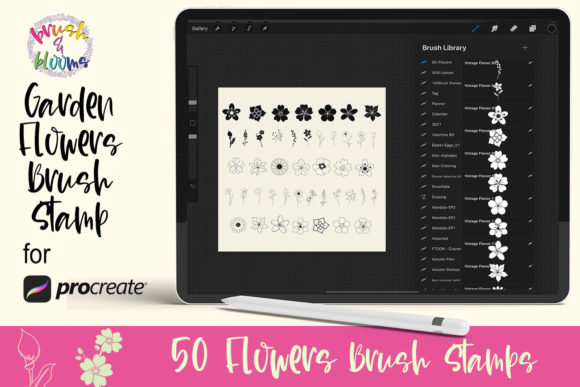
Digital illustration and graphic design on the iPad have evolved significantly, offering artists a vast array of tools to streamline their workflows. Among these tools, stamp brushes serve a specific function: they allow users to apply pre-drawn elements quickly without needing to render every detail from scratch. The Procreate Brush Stamp 50 Garden Flowers is one such resource designed to integrate botanical elements into digital projects efficiently. This collection includes 50 distinct floral elements contained within a single brush set file, tailored for use with the Procreate application version 5.0 or higher.
For designers, illustrators, and hobbyists evaluating whether this specific brush set aligns with their creative needs, it is essential to look beyond the visual appeal of the preview images. Understanding the technical requirements, practical applications, and potential limitations of stamp brushes compared to hand-drawing methods provides a clearer picture of their value in a professional or personal workflow.
Understanding the Functionality of Floral Stamp Brushes
At its core, the Procreate Brush Stamp 50 Garden Flowers operates as a library of reusable assets. Unlike standard drawing brushes that respond dynamically to stroke speed and pressure to create unique lines, stamp brushes deposit a static image onto the canvas each time the screen is tapped or swiped. This set comprises 50 individual garden flower graphics, ranging from simple blooms to more complex botanical arrangements. These elements are packaged in a .brushset file, which allows for easy installation directly into the Procreate app on compatible devices such as the iPad and iPad Pro.
The primary utility of this tool lies in speed and consistency. When a project requires repetitive floral motifs—such as creating a seamless pattern, designing a sheet of digital scrapbook paper, or adding decorative borders to labels—manually painting each flower can be time-consuming. By utilizing these stamps, a user can populate a background or frame a design element in a fraction of the time. Furthermore, because the elements are vector-like in their clarity (depending on the original resolution of the stamp), they offer a uniform aesthetic that can be difficult to achieve when drawing freehand under tight deadlines.
Ideal Use Cases and Practical Applications
Determining whether the Procreate Brush Stamp 50 Garden Flowers is a strong fit for your projects depends largely on the nature of your work. There are several scenarios where this tool excels:
- Digital Scrapbooking and Journaling: Users who create digital planners or scrapbooks often need diverse decorative elements to embellish pages. These 50 garden flowers provide immediate access to high-quality botanical accents without requiring advanced drawing skills.
- Pattern Design: Creating repeating patterns for textiles, wallpapers, or wrapping paper often involves arranging specific motifs. Having a dedicated set of 50 cohesive floral stamps allows designers to experiment with layout and composition rapidly before committing to a final design.
- Label and Packaging Concepts: For product designers sketching concepts for teas, cosmetics, or artisanal goods, these stamps can quickly mock up how floral branding might look on a label, facilitating faster client presentations.
- Background Textures: The brushes can be used to create subtle, organic backgrounds by lowering the opacity of the stamps and layering them, providing depth to illustrations without overwhelming the main subject.
In these contexts, the value proposition is clear: the brush set acts as a productivity multiplier. It allows the artist to focus on composition, color theory, and overall layout rather than getting bogged down in rendering individual petals and leaves repeatedly.
Technical Requirements and Compatibility
Before acquiring or utilizing this resource, it is crucial to verify hardware and software compatibility to ensure a smooth experience. The Procreate Brush Stamp 50 Garden Flowers is explicitly designed for the Apple ecosystem. Specifically, it requires:
- iPad or iPad Pro: The brushes are optimized for the iOS environment and the Procreate interface.
- Apple Pencil or Pressure-Sensitive Stylus: While stamp brushes generally do not rely heavily on pressure sensitivity for shape variation in the same way drawing brushes do, having a stylus that supports pressure ensures better control over placement and size adjustments if the brush settings allow for it.
- Procreate App Version 5.0 or Higher: This is a critical requirement. Older versions of Procreate may not support the newer brush engine features utilized in modern
.brushsetfiles, potentially leading to installation errors or malfunctioning brushes.
Users operating on Android tablets or using alternative illustration software will find this specific file format incompatible, necessitating the search for alternative formats such as PNG clipart packs that can be imported manually.
Tradeoffs and Considerations for Buyers
While stamp brushes offer efficiency, they come with inherent tradeoffs that potential users should evaluate objectively. The most significant consideration is the balance between convenience and artistic uniqueness. Because the Procreate Brush Stamp 50 Garden Flowers utilizes pre-made assets, there is a risk of designs looking generic if the stamps are used without modification. If multiple designers use the same popular brush set, their works may share identical floral elements, which can dilute brand identity for commercial projects.
Additionally, stamp brushes offer less flexibility than hand-drawn elements. If a project requires a flower at a specific angle or with a unique petal arrangement that differs from the 50 provided options, the user is limited to rotating, scaling, or distorting the existing stamp. In contrast, a hand-drawn approach allows for infinite customization. Therefore, these brushes are best viewed as building blocks rather than complete solutions. To maintain a unique style, artists often combine these stamps with hand-painted details, adjusting colors and blending modes to integrate the stamped elements seamlessly into the original artwork.
Making an Informed Decision
When deciding whether to incorporate the Procreate Brush Stamp 50 Garden Flowers into your toolkit, consider your current workflow bottlenecks. If you frequently find yourself spending excessive time painting repetitive botanical details, or if you lack confidence in drawing realistic flowers but need them for your compositions, this brush set offers a logical solution. It bridges the gap between concept and execution, allowing for rapid prototyping and design iteration.
However, if your primary goal is to develop foundational drawing skills or if your work demands highly bespoke, one-of-a-kind botanical illustrations where every leaf must be unique, relying solely on stamp brushes may hinder your artistic growth. In such cases, these tools might serve better as reference aids or background fillers rather than the focal point of the design.
Ultimately, the Procreate Brush Stamp 50 Garden Flowers represents a specialized utility within the broader Procreate ecosystem. Its value is not in replacing the artist's creativity but in augmenting it by handling repetitive tasks. For those working in scrapbooking, surface pattern design, or quick concept art, the inclusion of 50 versatile garden elements in a single, easy-to-install file provides a tangible advantage in efficiency. By understanding both the capabilities and the limitations of stamp technology, designers can make strategic choices that enhance their productivity while maintaining the integrity and uniqueness of their visual output.