Integrating Circle Doodle Frames into Your Creative Workflow
In the fast-paced world of digital content creation, consistency and visual appeal are often the deciding factors between a post that gets scrolled past and one that stops the user. For professionals ranging from social media managers to small business owners, the pressure to produce high-quality graphics daily can lead to creative fatigue. This is where specialized assets like Circle Doodle Frames become essential components of a streamlined design process. These are not merely decorative elements; they are functional tools designed to organize space, draw attention to key information, and maintain brand coherence across various platforms.
Understanding how to effectively integrate these assets requires looking beyond the aesthetic value and focusing on their role within a broader production pipeline. Whether you are an educator creating engaging lesson materials, a marketer designing Instagram stories, or a freelancer crafting custom greeting cards, the implementation of pre-made brush sets can significantly reduce turnaround time while elevating the final output.
The Role of Structured Framing in Visual Communication
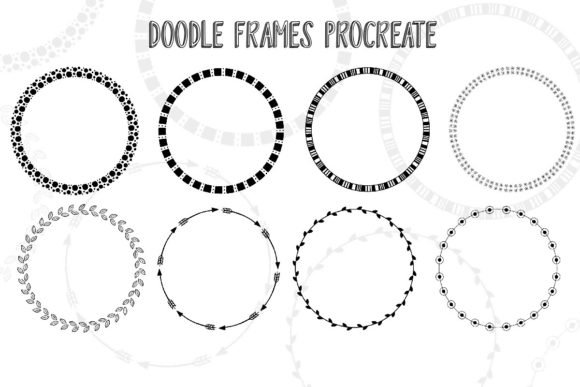
At its core, a circle doodle frame serves as a boundary and a focal point. In visual hierarchy, circular shapes naturally guide the eye toward the center, making them ideal for highlighting products, portraits, or critical text. The specific set of Circle Doodle Frames discussed here includes eight distinct variations featuring motifs such as dots, leaves, and arrows. This variety allows creators to match the frame style to the tone of the message without starting from scratch.
When planning a content calendar, the decision-making process often stalls at the design phase. By having a library of reliable frames ready to deploy, you shift the workflow from "creation" to "assembly." This distinction is vital for efficiency. Instead of spending twenty minutes drawing a border that may not look consistent with yesterday's post, you can apply a professional brushstroke in seconds. This ensures that your visual identity remains stable, which is crucial for building trust with your audience over time.
Pre-Production: Preparation and Asset Organization
Effective use of any digital tool begins before the actual design work starts. For users of Procreate on iOS and iPadOS, the first step in integrating these brushes is proper file management. Upon downloading the .brushset file, it should be imported immediately into a dedicated folder within the app. Labeling this folder clearly—for instance, "Social Media Assets" or "Brand Borders"—prevents clutter and ensures quick access during high-pressure deadlines.
Before applying the frames to a client project or a live campaign, it is advisable to run a compatibility check. While these brushes are optimized for Procreate, understanding how they interact with your specific canvas size and resolution is part of quality control. Test each of the eight frames on a sample canvas that matches your typical output dimensions (e.g., 1080x1920 for Stories or 1080x1080 for feed posts). Observe how the texture of the dots or the thickness of the leaf patterns renders at different scales. This preparatory step eliminates surprises later in the process and ensures that the lines remain crisp and professional regardless of the device used to view the content.
Execution: Streamlining the Design Process
Once the assets are organized, the real value of Circle Doodle Frames emerges during the execution phase. Consider a typical workflow for a small business owner promoting a new product. The process usually involves sourcing a photo, selecting a background color, and adding copy. Without a framing system, the image might float aimlessly on the canvas, competing with the text for attention.
By introducing a circle frame early in the composition, you establish a designated zone for the product image. If the chosen frame features arrows, you can strategically orient them to point toward a call-to-action button or a discount code. If the design calls for a softer, organic feel, the leaf-patterned frame provides an immediate thematic connection to nature or wellness without requiring custom illustration skills. This ability to swap styles rapidly allows for A/B testing of visual concepts. You can duplicate your canvas, apply a different frame from the set to each version, and evaluate which layout communicates the message more effectively.
For educators and bloggers, these frames function as containers for information. When creating infographics or step-by-step guides, placing individual steps inside uniform circles creates a sense of order and progression. The dotted frames, in particular, offer a playful yet structured look that works well for instructional content aimed at younger audiences or for lighthearted lifestyle topics. The key to successful implementation here is consistency; once you select a frame style for a specific series of posts or pages, stick with it to reinforce recognition.
Post-Production and Long-Term Usability
The utility of these brushes extends beyond the initial export. In a professional setting, files often need to be revisited for updates or repurposing. Because the Circle Doodle Frames are applied as brushstrokes within Procreate, they remain editable as long as you retain the layered source file. This flexibility is a significant advantage over flattened PNG overlays. If a client requests a change in the border color to match a seasonal campaign, you can simply adjust the layer properties or repaint the stroke without losing the hand-drawn texture that gives the asset its character.
Furthermore, maintaining a standardized library of assets contributes to long-term brand equity. Over months and years, your audience begins to associate specific visual cues with your content. The unique combination of hand-drawn aesthetics and geometric precision found in this set helps differentiate your work from the generic, template-heavy designs that saturate the market. Regularly auditing your asset collection ensures that you are utilizing the full range of the eight included frames, preventing overreliance on a single style and keeping your visual output fresh.
Integration with Broader Creative Ecosystems
While Procreate is the primary environment for these brushes, the outputs often feed into larger ecosystems. A graphic designed in Procreate using these frames might be exported and further annotated in Canva, assembled into a video reel in CapCut, or embedded into a newsletter via Mailchimp. Understanding this interoperability is crucial. When exporting your work, ensure you save files with transparent backgrounds if the frame needs to sit over dynamic video footage or colored web sections.
Collaboration is another area where standardized assets shine. If you work with a team of freelancers or virtual assistants, providing them with this specific brush set ensures that everyone produces work that looks like it came from a single source. This reduces the time spent on revisions and corrections regarding style mismatches. It transforms the Circle Doodle Frames from a personal preference into a team standard, facilitating smoother handoffs and clearer communication regarding design expectations.
Maximizing Efficiency and Quality Control
To truly leverage these tools, one must adopt a mindset of continuous improvement. Pay attention to how the brushes perform under different pressure settings if you are using an Apple Pencil. Some users prefer a lighter touch for a sketchier look, while others apply firm pressure for bold, solid lines. Documenting your preferred settings for each of the eight frames can speed up future projects. Additionally, consider the context in which the frames are used. A frame with intricate leaf details might look stunning on a high-resolution tablet but could lose definition when shrunk down for a mobile notification preview. Always review your final exports on the intended display device to guarantee legibility and impact.
In conclusion, the adoption of Circle Doodle Frames is less about adding more items to your toolkit and more about refining your existing workflow. By providing a reliable, versatile, and professionally crafted solution for framing content, these brushes allow creators to focus on what matters most: the message and the strategy behind it. Whether you are planning a week's worth of social content, designing a suite of educational materials, or launching a marketing campaign, the integration of these assets offers a practical path to higher quality and greater efficiency. Start by organizing your library, testing the variations, and systematically incorporating them into your next project to experience the difference a structured approach can make.