Mastering Digital Romance: A Practical Guide to Using 20 Heart Procreate Brush Stamps
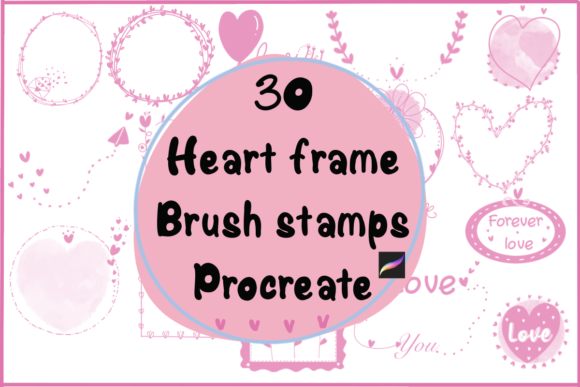
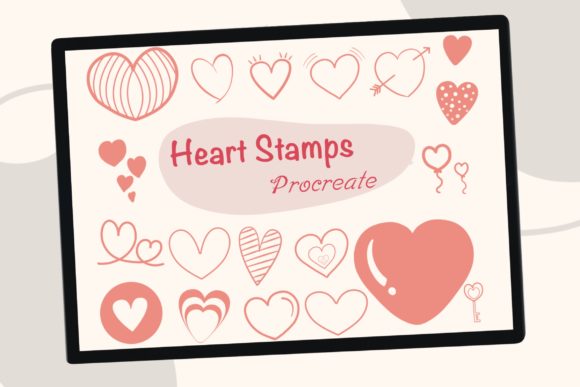
Digital illustration often feels like a race against time, especially when you are trying to capture a specific emotion or meet a client deadline. This is where specialized tools become essential rather than just optional extras. The 20 Heart Procreate Brush Stamps collection offers a streamlined solution for artists who need to incorporate romantic or affectionate elements into their work without reinventing the wheel every time. These are not just static images; they are dynamic brush stamps designed specifically for the Procreate app on iPad. With a simple tap of your Apple Pencil or finger, you can place a perfectly formed heart on your canvas, ready to be scaled, colored, and customized to fit your unique style.
However, simply downloading a brush set does not guarantee professional results. Many creators, from hobbyists making stickers to entrepreneurs designing sublimation products, fall into common traps when integrating stamp brushes into their workflow. Understanding these pitfalls is the difference between a design that looks generic and one that feels intentional and high-quality.
The Trap of One-Size-Fits-All Scaling
One of the most frequent mistakes users make with stamp brushes is ignoring the resolution limits when scaling. Because the 20 Heart Procreate Brush Stamps are vector-like in their flexibility but raster-based in execution within Procreate, there is a limit to how much you can enlarge them before they lose clarity. Beginners often stretch a small heart stamp to fill a large portion of the canvas, resulting in pixelation or blurry edges that ruin the professional look of an invitation or graphic.
To avoid this, always test your stamp at the maximum size you intend to use before committing to a full design. If you need a massive heart for a background element, it is better to create a new layer and paint over the stamp or use it as a reference to trace a larger version. Remember, these stamps are designed for efficiency, not necessarily for infinite scalability. Use them for their intended purpose: adding quick, crisp details to invitations, social media graphics, or sticker sheets where they remain within a reasonable size range.
Misunderstanding Color Dynamics and Blending Modes
Another area where creators often stumble is assuming the default color of the stamp is final. A common misconception is that a red heart stamp must remain red. In reality, the power of Procreate lies in its layer management and blending capabilities. When you download the zip file containing the single brush set, you receive tools that inherit the color currently selected in your palette. Yet, many users forget to change their active color before tapping, leading to a canvas cluttered with default hues that require tedious erasing or recoloring later.
A more efficient approach is to utilize Clipping Masks and Blend Modes. Instead of painting inside the lines of your heart stamp, place the stamp on its own layer, select your desired texture or gradient on a layer above it, and clip it to the heart. This allows you to fill the shape with complex patterns, gold foil textures, or watercolor washes instantly. Additionally, experimenting with blend modes like "Multiply" for shadows or "Overlay" for glowing effects can transform a flat stamp into a dimensional piece of art. This technique is particularly useful for sublimation designs where depth and texture drive sales.
Overlooking the Value of Customization
While the 20 Heart Procreate Brush Stamps provide twenty distinct shapes, relying solely on the out-of-the-box forms can make your portfolio look identical to thousands of others using the same assets. The mistake here is treating the stamp as the final product rather than a starting point. Digital art thrives on iteration. If you use the stamp exactly as provided for every project, you miss the opportunity to develop a signature style.
Take advantage of Procreate's ability to add details. After stamping a heart, switch to a standard drawing brush to add hand-drawn highlights, sketch lines, or distress marks. You can also combine multiple stamps; overlap two different heart shapes from the set and merge the layers to create a unique composite icon. For those creating branding materials or logos, this step is crucial. A slight modification to the curve or the addition of a custom flourish ensures that your graphic stands out in a crowded market. The goal is to speed up the design process, not to automate the creativity out of it.
File Management and Workflow Efficiency
It may seem minor, but poor file management is a silent productivity killer. When you receive the zip file containing the brush set, the immediate urge is to import it and start creating. However, failing to organize your brush library can lead to confusion later. If you mix these specific heart stamps with your general sketching brushes, you will waste valuable time searching for them during a rush.
Create a dedicated brush group in Procreate labeled "Stamps" or "Elements" and keep your 20 Heart Procreate Brush Stamps there. This organizational habit pays off when you are working on complex projects like digital planners or extensive sticker packs. Furthermore, always keep the original .zip file backed up in a cloud service or external drive. Technology fails, and iPads get replaced; losing access to your purchased assets because of a disorganized download folder is an easily avoidable frustration.
Choosing the Right Application for Your Project
Not every project benefits from stamp brushes, and recognizing when to use them is a mark of an experienced designer. These stamps are ideal for repetitive elements, such as creating a patterned background for wedding invitations or populating a sheet of digital stickers. They excel in scenarios where consistency and speed are paramount. However, if you are aiming for a highly organic, painterly masterpiece where every stroke needs to convey unique pressure and movement, a stamp might feel too rigid.
Consider the end-use of your design. If you are preparing files for sublimation printing, ensure your canvas resolution is set to 300 DPI before you begin stamping. Using a low-resolution canvas will result in poor print quality regardless of how crisp the brush looks on your screen. For web graphics and social media posts, standard screen resolution is sufficient, allowing you to work faster with smaller file sizes. Matching the tool to the medium ensures that the efficiency gained from using the 20 Heart Procreate Brush Stamps translates into actual time savings without compromising the final output.
Ultimately, these tools are about empowering your creativity, not restricting it. By avoiding the pitfalls of improper scaling, neglecting color customization, and skipping personalization, you can elevate your digital projects significantly. Whether you are a freelancer rushing to meet a deadline or a small business owner crafting your next product line, mastering these nuances ensures that your heart-themed designs resonate with warmth and professionalism. Take the time to experiment with the settings, respect the technical limitations, and infuse your own artistic voice into every tap of the pencil.