Evaluating Butterflies Brush Stamps for Procreate: A Practical Guide for Digital Artists and Tattoo Designers
Digital illustration has evolved significantly, offering tools that bridge the gap between traditional sketching and final vector output. For professionals in fields like tattoo design, stationery creation, and surface pattern design, efficiency often hinges on having the right assets. The Butterflies Brush Stamps for Procreate represents a specific category of digital resource designed to streamline the workflow for iPad users. Unlike standard painting brushes that simulate media like watercolor or charcoal, stamp brushes are engineered to place pre-designed shapes onto the canvas with a single tap. This distinction is critical for artists who need to iterate quickly on composition without redrawing complex elements from scratch.
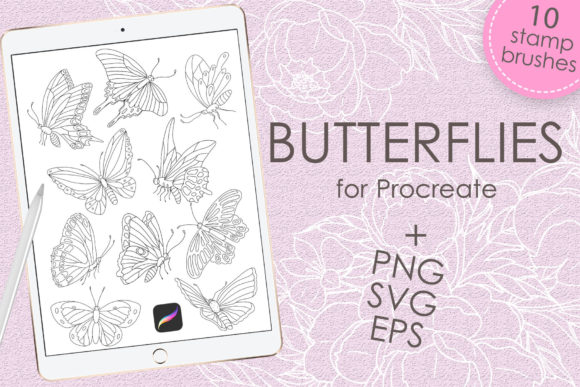
This collection typically includes a dedicated brush set file alongside individual high-resolution assets. When evaluating whether this tool fits your workflow, it is essential to understand not just what the product contains, but how it integrates into a broader creative process. The package generally consists of a .brushset file for immediate use within the Procreate application, accompanied by a ZIP archive containing 10 PNG files, an EPS file, and an SVG file. This multi-format approach acknowledges that modern designers often work across different platforms, requiring flexibility beyond a single app ecosystem.
Understanding the Format and Technical Requirements
Before investing time in downloading or purchasing digital assets, verifying compatibility is a fundamental step. The Butterflies Brush Stamps for Procreate are engineered specifically for the Apple ecosystem. To utilize the .brushset file effectively, you will need an iPad Pro or a standard iPad model paired with an Apple Pencil or a third-party stylus that supports pressure sensitivity. Furthermore, the host application must be Procreate version 5.0 or higher. Older versions of the software may not recognize the file structure or support the specific grain and shape dynamics embedded in these newer brush sets.
It is important to note a significant limitation: these brushes function exclusively within the Procreate app on iPad. They will not operate in Adobe Photoshop, Clip Studio Paint, or desktop-based illustration software. This is a common constraint for proprietary brush formats. However, the inclusion of PNG, EPS, and SVG files in the download mitigates this restriction. If you primarily work on a desktop or prefer vector-based workflows, the included SVG and EPS files allow you to import the butterfly designs into programs like Adobe Illustrator or Affinity Designer. The PNG files serve as a universal fallback for any software that supports image layers, ensuring the asset remains useful even if you switch devices.
Comparing Stamp Brushes to Hand-Drawn Approaches
The decision to use a stamp set versus drawing elements manually often comes down to the balance between artistic control and production speed. For a tattoo artist, for instance, the consultation phase requires rapid visualization. Clients often want to see how a specific motif, such as a butterfly, looks on their arm or shoulder in various sizes and orientations. Manually sketching ten variations of a butterfly during a consultation can be time-consuming and may detract from the interpersonal aspect of the meeting. In this scenario, Butterflies Brush Stamps for Procreate offer a distinct advantage by allowing the artist to populate a silhouette of the client's body with options instantly.
Conversely, hand-drawing offers unlimited customization. If a project demands a highly specific species of butterfly with unique wing patterns that do not match the stamp set, a manual approach is superior. Stamp brushes are best viewed as foundational elements or starting points. A skilled illustrator might use the stamp to establish the basic shape and symmetry, then utilize Procreate's drawing tools to modify the wings, add texture, or integrate the element seamlessly into a larger piece. This hybrid approach leverages the speed of the stamp while retaining the bespoke quality of hand-rendered art.
Workflow Integration for Tattoo Artists and Illustrators
For tattoo artists, the transition from flash sheets to custom stencils is a critical part of the daily routine. A set of 10 distinct butterfly stamps provides enough variety to create diverse flash pages without repetition. The value here lies in consistency; each stamp maintains a uniform line weight and style, which helps in creating cohesive collections. When preparing a stencil, the ability to scale the brush dynamically using the Apple Pencil's pressure or size slider allows for precise fitting onto the curvature of a limb.
Illustrators working on stationery or textile prints face different challenges, primarily regarding resolution and repeatability. While the brush stamps are raster-based (pixel-based) within Procreate, the inclusion of vector files (EPS and SVG) is a crucial differentiator. Vector graphics are resolution-independent, meaning they can be scaled infinitely without losing quality. This makes the accompanying SVG and EPS files indispensable for large-format printing, such as wallpapers or fabric rolls, where pixelation would be unacceptable. Therefore, the product serves a dual purpose: the brush set for rapid ideation and mockups on the iPad, and the vector files for final production in other software.
Evaluating Strengths and Limitations
When assessing the utility of this resource, several strengths stand out. The primary benefit is efficiency. The ability to deploy complex shapes instantly accelerates the brainstorming phase. Additionally, the multi-format delivery ensures longevity; even if you eventually move away from Procreate, the vector and image files remain usable assets. The specific focus on butterflies also targets a perennially popular motif in both tattoo culture and decorative arts, ensuring the designs have broad applicability.
However, there are tradeoffs to consider. The most obvious limitation is the fixed design of the stamps. You are restricted to the 10 variations provided in the set. If your artistic style relies heavily on organic imperfection or highly stylized abstraction that differs from the stamp's aesthetic, the tool may feel restrictive. Furthermore, because the brushes are raster-based within the app, scaling them up significantly beyond their original resolution could result in pixelation if the underlying PNG data is not sufficiently high-res. Users must verify the DPI (dots per inch) of the source images if they intend to print the direct output from Procreate at large sizes.
Decision Factors: Is This Resource Right for You?
Choosing to incorporate Butterflies Brush Stamps for Procreate into your toolkit depends largely on your current workflow bottlenecks. If you find yourself spending excessive time drawing repetitive nature elements when your core value lies in composition, coloring, or lettering, this set is a logical investment. It acts as a force multiplier, freeing up mental energy for more complex creative decisions.
On the other hand, if you are a purist who believes every line must be drawn by hand to maintain authenticity, or if your work requires hyper-realistic biological accuracy that generic stamps cannot provide, you may find limited use for the brush set itself. In such cases, the value proposition shifts entirely to the included vector files, which can be used as tracing references or base layers for your own detailed rendering.
Another consideration is the software ecosystem. If your studio relies heavily on Windows-based PCs and Adobe Creative Cloud, the .brushset file will be unusable directly. However, the presence of the cross-platform PNG, EPS, and SVG files means the purchase is still viable, provided you are comfortable importing assets rather than using them as native brushes. For iPad-centric creators, particularly those who have updated to Procreate 5.0+, the integration is seamless and offers immediate utility.
Maximizing the Value of the Asset Pack
To get the most out of this collection, consider adopting a layered workflow. Start by using the stamp brushes to block out the placement and scale of the butterflies in your composition. Once satisfied with the arrangement, lower the opacity of the stamp layer and create a new layer above it to trace or refine the details. This method combines the speed of the stamp with the customization of hand-drawing. Additionally, experiment with Procreate's blending modes. Changing a stamp layer from "Normal" to "Multiply" or "Overlay" can help integrate the black ink lines of the stamp into colored backgrounds more naturally, simulating the look of ink on skin or paper.
Ultimately, digital tools like Butterflies Brush Stamps for Procreate are not about replacing skill but enhancing productivity. They represent a strategic choice to automate the mundane aspects of design so that the artist can focus on storytelling and aesthetics. By understanding the technical requirements, acknowledging the limitations of raster stamps versus vector flexibility, and aligning the tool with specific project needs, professionals can make an informed decision on whether this resource belongs in their digital arsenal.