Mastering Fashion Illustration with the 9 Head Body Pose Set Procreate Stamp
In the fast-paced world of digital fashion design, efficiency is just as critical as creativity. Whether you are a seasoned professional sketching for a major label or an independent creator building a portfolio, the time spent drawing foundational body structures can often detract from focusing on garment details and fabric textures. This is where specialized tools like the 9 Head Body Pose Set Procreate Stamp become indispensable. By integrating high-quality stamp brushes into your workflow, you transform the initial stages of illustration from a repetitive task into a streamlined creative process.
The Foundation of Professional Fashion Sketches
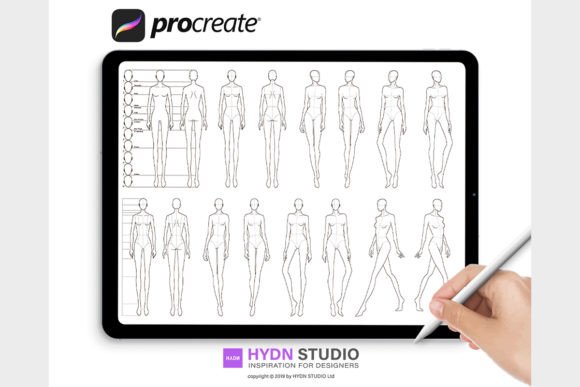
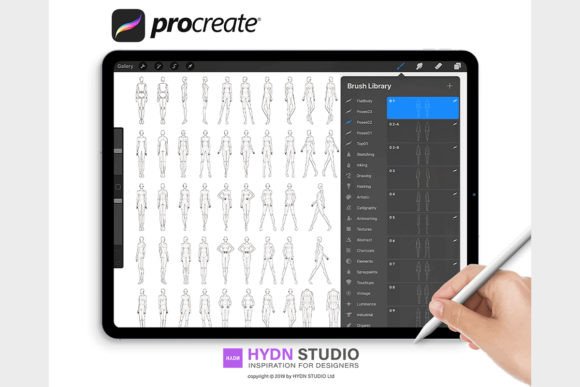
Fashion illustration relies heavily on proportion. The industry standard often utilizes the "nine-head" rule, where the height of the figure is equivalent to nine heads stacked vertically. This elongation creates the elegant, stylized look synonymous with high fashion. However, manually constructing these grids and poses for every single sketch can be tedious and prone to inconsistency. The 9 Head Body Pose Set Procreate Stamp addresses this by providing pre-rendered, perfectly proportioned bases that allow artists to jump straight into the design phase.
These brushes are not merely static images; they are optimized digital tools designed specifically for the Procreate ecosystem. When you utilize Procreate Stamp Brushes, you are leveraging vectors and high-resolution raster data that ensure every line remains crisp, regardless of how much you zoom in or scale the image. This clarity is vital when presenting work to clients or preparing files for print, where pixelation can undermine professionalism.
Key Features and Technical Specifications
Understanding what makes a brush set effective requires looking at the technical deliverables. A comprehensive package, such as the one containing 60 Poses across 32 stamp brushes, offers immense versatility. This variety ensures that you are not limited to a single stance; instead, you have access to dynamic walking poses, seated positions, and action shots that bring life to your collections.
- High-Quality Optimization: The brushes are engineered so that every single line is clear and easy to work with, eliminating the fuzzy edges often found in lower-quality imports.
- Diverse Library: With 60 distinct poses, the set covers a wide range of movements required for different garment types, from flowing evening gowns to structured streetwear.
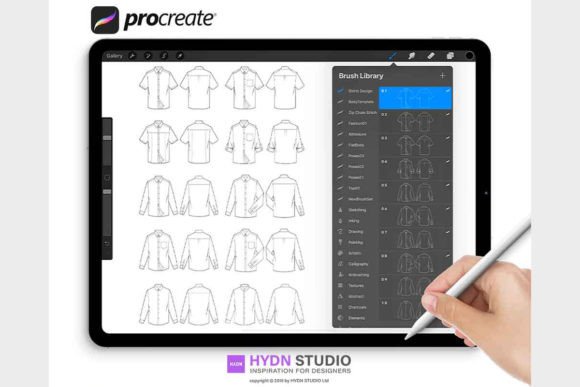
- Supplementary Resources: Many premium sets include PDF documents with T-shirt and Jeans fashion flat sketches. These technical flats are essential for communicating construction details to pattern makers and manufacturers.
- File Compatibility: Delivered as a
.brushsetfile, these tools are ready for immediate integration into your iPad workflow without complex conversion processes.
Who Benefits from Digital Fashion Stamps?
The utility of Procreate Stamps extends beyond just illustrators. While fashion designers are the primary users, the applications are broad:
- Fashion Designers: Quickly visualize multiple iterations of a garment on a consistent body type to evaluate drape and fit.
- Students and Educators: Focus on learning fabric rendering and color theory without getting bogged down by anatomical proportions in early lessons.
- Content Creators: Produce consistent social media content showcasing outfit ideas or design tips with a polished, professional aesthetic.
- Tech Pack Developers: Use the included flat sketches to rapidly assemble technical documentation for production teams.
For business owners, the value lies in speed-to-market. By reducing the time spent on the underdrawing, you can present more concepts to clients in less time, increasing your billable hours or project throughput.
Real-World Applications and Scenarios
Imagine you are tasked with creating a lookbook for a new denim line. Instead of sketching ten different models from scratch, you open Procreate and select the 9 Head Body Pose Set Procreate Stamp. You choose five standing poses and three walking poses. Within minutes, your canvas is populated with perfectly proportioned figures. You then create a new layer above the stamp and begin sketching the jeans, focusing entirely on the stitching, wash effects, and distressing details.
In another scenario, a student might be struggling with the concept of movement in fabric. By using a pose stamp that features a twisting torso or a raised arm, they can study how light interacts with folds in dynamic positions. The stamp acts as a reliable skeleton, allowing the artist to experiment freely with the "skin" of the illustration—the clothing—without worrying about the underlying anatomy collapsing.
Evaluating Suitability for Your Projects
While Procreate Brushes offer significant advantages, it is important to evaluate if they fit your specific workflow. If your artistic style relies heavily on extremely loose, abstract gestural lines where proportion is intentionally distorted for effect, rigid stamps might feel restrictive. However, for commercial fashion illustration, where clarity and standard proportions are key, these tools are invaluable.
Consider the limitation of uniformity. Using the same base repeatedly can lead to a portfolio that looks repetitive if not managed well. The solution lies in the variety offered by robust sets. With 60 poses available, you can mix and match to ensure diversity. Furthermore, because these are digital layers, you can subtly adjust the opacity or use the liquify tool in Procreate to tweak a pose slightly, adding a custom touch to the standardized base.
Practical Installation and Setup
Getting started with these tools is straightforward, provided you follow the correct installation steps. The process is designed to be user-friendly, whether you are transferring files from a computer or working directly on your iPad.
The digital file typically comes as a compressed ZIP archive. Once downloaded, you must decompress this file to access the .brushset file. This specific file extension is crucial, as it contains the entire library of brushes in a single package, ensuring that all 32 stamp brushes and their settings are installed simultaneously.
Method 1: Adding Brush Sets via Mac
If you have access to a Mac running macOS 10.11 or later, the most efficient method is using AirDrop. Simply locate the .brushset file on your computer, right-click, and select Share > AirDrop. Choose your iPad from the list of devices. This method ensures that the file integrity is maintained and the brushes appear instantly in Procreate without needing intermediate cloud storage steps.
Method 2: Adding Brush Sets Directly from iPad
For those working exclusively on mobile devices, cloud storage services like Google Drive, OneDrive, Dropbox, or iCloud are essential. Navigate to the folder where you saved the decompressed brush set. Tap on the file, then click the small "..." (more options) icon. Select Export and then choose Open in... or Copy to Procreate. Upon opening Procreate, you will see a notification that a new set has been added, usually appearing at the very top of your brush library.
Maximizing the Value of Your Toolset
To truly benefit from the 9 Head Body Pose Set Procreate Stamp, treat it as a foundation rather than a crutch. The magic happens in the layers you add on top. Experiment with different blending modes to integrate the stamp lines with your coloring. Use the included PDF instructions not just for installation, but to understand the intended workflow for the accompanying flat sketches.
Remember that Fashion illustration is a blend of technical accuracy and artistic flair. These stamps provide the technical accuracy, freeing your mind to focus on the flair. Whether you are drafting a quick concept for a meeting or rendering a final piece for a magazine spread, having a reliable set of body poses allows you to maintain a high standard of quality while significantly reducing production time.
In conclusion, integrating high-quality Procreate Stamps into your digital arsenal is a strategic move for any modern fashion creator. It bridges the gap between traditional drafting skills and modern digital efficiency, allowing you to produce more work, faster, without compromising on the elegance and precision that the fashion industry demands.