Optimizing Fashion Workflows with the Shirts Design Set Procreate Stamp Brushes
For fashion illustrators and apparel designers working on the iPad, the balance between creative freedom and technical efficiency is constant. While freehand drawing allows for unique expression, the repetitive nature of rendering garment bases can slow down the conceptual phase. This is where specialized resources like the Shirts Design Set Procreate Stamp Brushe collection become relevant. Unlike generic brush packs that focus solely on texture or sketching, this specific set is engineered to streamline the creation of flat sketches and silhouettes, offering a distinct approach to digital fashion illustration.
Understanding whether this toolset fits your workflow requires looking beyond the marketing description and evaluating how stamp brushes function compared to traditional drawing methods. The core value proposition here is not just about having pre-drawn shapes, but about integrating high-quality, optimized vectors into a raster-based environment to maintain clarity in every line.
Defining the Tool: Stamps vs. Traditional Sketching
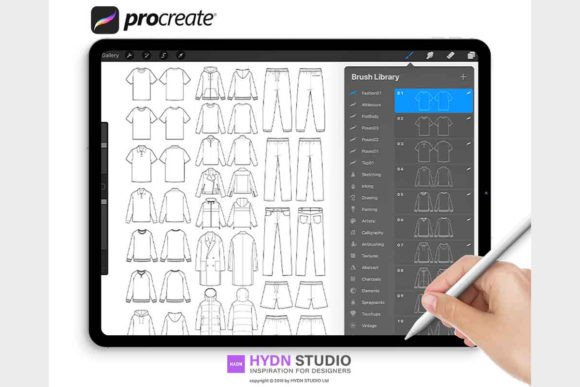
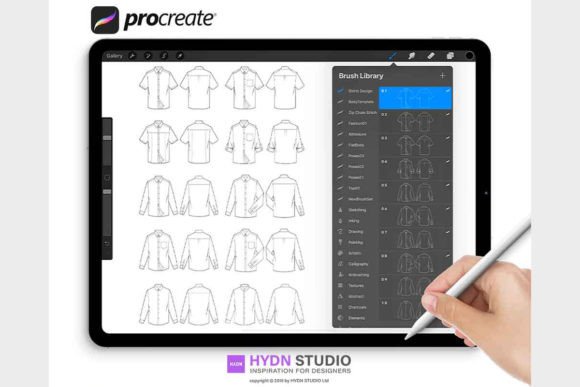
The Shirts Design Set Procreate Stamp Brushe is essentially a curated library of vector-based stamps converted into Procreate's proprietary brush format. The set typically includes two primary categories: fashion flat sketch stamp brushes and silhouette stamp brushes. The distinction lies in their application. Flat sketch stamps provide detailed outlines of garments—collars, cuffs, seams, and hems—rendered with the precision required for technical packages. Silhouette stamps, on the other hand, offer solid shapes designed specifically for use with clipping masks, allowing designers to quickly apply fabrics or patterns without worrying about staying within the lines.
When comparing this approach to starting from scratch, the tradeoff is between customization speed and foundational control. A designer drawing every shirt from zero has total control over proportion and drape but spends significant time on repetitive geometry. Using the Shirts Design Set Procreate Stamp Brushe shifts the focus from construction to decoration and detailing. It is akin to using a stencil versus a freehand pen; the outline is consistent, allowing the artist to concentrate on fabric rendering, color theory, and presentation.
However, it is important to note that these are not "one-click" solutions for finished artwork. They are foundational tools. The quality of the final output still depends on the user's ability to manipulate the stamps, adjust proportions using Procreate's transform tools, and integrate them seamlessly with hand-drawn elements. The brushes are optimized to ensure that lines remain crisp regardless of scaling, a common issue with lower-quality stamp sets that pixelate when enlarged.
Evaluating Fit: Who Benefits Most from Stamp Brushes?
Not every illustrator will find the same value in this resource. The decision to adopt the Shirts Design Set Procreate Stamp Brushe often comes down to the specific stage of the design process and the intended output.
- Tech Pack Creators: For professionals who need to produce clean, standardized technical drawings for manufacturers, consistency is key. These brushes eliminate variation in basic garment shapes, ensuring that a t-shirt template looks identical across different pages of a document.
- Surface Pattern Designers: Those who specialize in creating prints for apparel benefit significantly from the silhouette stamps. By using these shapes as clipping masks, they can visualize how a pattern repeats and flows over a garment without needing to draw the garment itself.
- Students and Educators: In an academic setting, these tools allow students to focus on learning color application and fabric texture rather than getting bogged down in the mechanics of drawing perfect symmetry.
Conversely, high-fashion editorial illustrators who rely on exaggerated proportions and fluid, expressive lines may find pre-made stamps too rigid. If your style depends on breaking the rules of anatomy and garment construction, a standard stamp set might feel restrictive. In such cases, these brushes might serve better as a underlying guide rather than the final visible layer.
Technical Considerations and Installation
A crucial aspect of evaluating any digital asset is the ease of integration into your existing ecosystem. The Shirts Design Set Procreate Stamp Brushe is distributed as a .brushset file, which is the modern standard for Procreate assets. This format is superior to older methods that required importing individual .brush files one by one. A single .brushset file installs the entire collection instantly, organizing them into a dedicated folder within the app.
The installation process varies slightly depending on your hardware setup, but the workflow is designed to be straightforward for both Mac and iPad users.
Installation on macOS
If you manage your files on a Mac running MacOS 10.11 or later, the most efficient method is AirDrop. After decompressing the downloaded zip file, locate the .brushset file. You can send this directly from your computer to your iPad via AirDrop. Upon tapping the file on the iPad, Procreate will launch automatically, and the new brush set will appear at the very top of your brush library. This method ensures that file integrity is maintained and reduces the risk of losing files in complex cloud folder structures.
Installation via Cloud Services on iPad
For users who work exclusively on the iPad or do not have a Mac, cloud storage integration is the primary pathway. Whether you use Google Drive, OneDrive, Dropbox, or iCloud, the process follows a logical sequence:
- Navigate to the folder containing the unzipped
.brushsetfile within your preferred cloud app. - Select the file and tap the "Share" or "Export" icon (often represented by three dots or a square with an arrow).
- Choose "Open in..." or "Copy to Procreate" from the share sheet.
- Procreate will open, and the import will finalize immediately.
It is worth noting that the package often includes a PDF document with installing instructions. While the process is generally intuitive, having this reference can be helpful for users unfamiliar with iOS file management or those encountering permission issues with specific cloud providers.
Comparative Analysis: Stamp Sets vs. Vector Software
A common question among designers is whether they should use Procreate stamp brushes or stick to vector-based software like Adobe Illustrator for flat sketches. Both approaches have merit, and the choice often depends on the desired aesthetic and delivery format.
Vector software offers infinite scalability and mathematical precision, making it the industry standard for final production files. However, the learning curve is steeper, and the interface can feel sterile for quick ideation. The Shirts Design Set Procreate Stamp Brushe bridges this gap. It brings the cleanliness of vector-like lines into the organic, tactile environment of Procreate. While the end result is a raster image (pixels) rather than a vector path, the high resolution and optimization of these brushes mean they are suitable for most presentation needs, including lookbooks, social media content, and internal review documents.
The strength of using these stamps in Procreate lies in the hybrid workflow. You can stamp a base shirt, lower the opacity, and trace over it with textured brushes to add hand-drawn warmth. Or, you can use the silhouette stamp as a mask and paint freely inside it. This flexibility is harder to achieve in strict vector environments without complex layer management.
Making the Decision
Ultimately, adopting the Shirts Design Set Procreate Stamp Brushe is a strategic decision to optimize time without sacrificing quality. It is best suited for designers who need to produce high volumes of clear, professional-looking flats or who want to experiment with patterns on garments rapidly. The inclusion of both detailed flat sketches and clipping-mask-ready silhouettes provides a comprehensive toolkit for various stages of the design process.
Before purchasing or downloading, consider your current bottlenecks. If you spend hours drawing basic outlines that could be standardized, this set offers a tangible solution. If your priority is purely artistic expression with no need for technical consistency, you may prefer building your shapes from scratch. By understanding the specific capabilities and limitations of stamp brushes, you can better determine if this resource aligns with your professional goals and creative style.