Evaluating Procreate Stamp Doodle Shapes and Lines for Digital Illustration
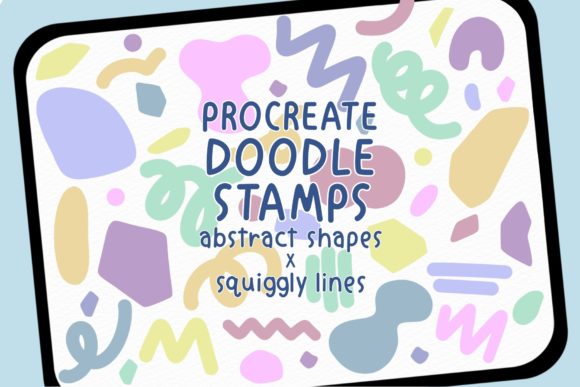
Digital illustration on the iPad has evolved significantly, moving from simple sketching tools to comprehensive studios capable of producing professional-grade artwork. Within this ecosystem, Procreate Stamp Doodle Shapes and Lines represents a specific category of digital assets designed to streamline the creative process. This collection, comprising two .brushset files and a total of 112 stamps, offers artists a curated library of abstract shapes and squiggly lines. Understanding the utility, limitations, and ideal applications of these tools is essential for illustrators deciding whether to integrate them into their workflow.
Understanding the Asset Collection
The Procreate Stamp Doodle Shapes and Lines package is not a standalone application but a specialized add-on for the Procreate software on iPad. It functions as a set of pre-made textures and forms that users can apply instantly to their canvas. The collection is divided into two distinct .brushset files, organizing the 112 individual stamps into manageable categories. These stamps generally fall into two visual groups: geometric or organic abstract shapes and hand-drawn style squiggly lines.
Unlike standard drawing brushes that rely on stroke dynamics to create variation, stamp brushes deposit a fixed image or pattern with each tap or drag. This distinction is crucial for users evaluating the tool. The "doodle" aspect implies an informal, hand-crafted aesthetic, suggesting that the shapes are designed to look less like perfect vector geometry and more like natural, human-made marks. This quality is often sought after in editorial illustration, journaling, and texture-heavy designs where rigid perfection can feel sterile.
Primary Benefits and Workflow Efficiency
The primary value proposition of Procreate Stamp Doodle Shapes and Lines lies in efficiency and consistency. For artists who frequently incorporate decorative elements, background patterns, or textural overlays into their work, creating these elements from scratch can be time-consuming. By utilizing a library of 112 pre-designed stamps, an illustrator can rapidly populate a composition with visual interest without breaking their creative flow.
Furthermore, these stamps provide a level of stylistic consistency that can be difficult to achieve when drawing repetitive elements manually. When an artist needs a series of similar squiggly lines or abstract blobs to frame a subject or fill negative space, using a stamp ensures that the weight, texture, and general form remain uniform throughout the piece. This is particularly beneficial for commercial projects where brand consistency or a cohesive visual language is required across multiple deliverables.
Another significant benefit is the reduction of technical friction. Artists who may struggle with drawing specific organic shapes freehand can use these stamps to achieve a desired look immediately. This allows the creator to focus more on composition, color theory, and storytelling rather than getting bogged down in the mechanics of rendering individual decorative elements.
Technical Considerations and Limitations
While the benefits are clear, potential users must also consider the technical constraints associated with this type of asset. First and foremost, these brushes work only in the Procreate application. They are incompatible with Adobe Photoshop, Clip Studio Paint, or any desktop-based illustration software. For artists who utilize a hybrid workflow involving both iPad and desktop environments, this limitation restricts the portability of the assets. If a project begins on the iPad using these stamps but requires final adjustments in Photoshop, the artist may need to rasterize the layers or recreate the elements, potentially losing editability.
Additionally, the nature of stamp brushes means they offer less dynamic control compared to standard drawing brushes. While Procreate allows for some adjustment in size and opacity, the fundamental shape of the stamp remains static. An artist cannot easily alter the curvature of a specific squiggle or the internal structure of an abstract shape without masking or transforming the layer manually. For projects requiring highly customized, unique variations of every element, a standard brush or hand-drawing approach might yield more organic results.
There is also the consideration of resolution. Stamp brushes are bitmap-based. If a user scales a stamp up significantly beyond its intended size, they risk pixelation or a loss of crispness. Users must evaluate whether the resolution of the 112 stamps within the .brushset files meets the requirements of their intended output, whether that be high-resolution print or screen-only display.
Ideal Use Cases
The Procreate Stamp Doodle Shapes and Lines collection is a strong fit for several specific scenarios. It is particularly well-suited for digital journaling and planning, where the aesthetic goal is often a playful, handwritten look. The squiggly lines and abstract shapes mimic the feel of washi tape, stickers, and pen doodles commonly found in physical bullet journals.
In the realm of editorial and social media illustration, these tools excel at creating quick, engaging backgrounds or framing devices. Content creators who need to produce visuals rapidly for platforms like Instagram or blogs can use these stamps to add texture and depth to flat illustrations without spending hours on detailing. They are also effective for pattern design, where the repetition of abstract shapes can be used to generate seamless textures for fabrics, wallpapers, or packaging mockups.
Educators and workshop leaders who teach digital art may also find value in these sets. They provide students with immediate access to professional-looking elements, allowing them to focus on learning composition and color without being hindered by a lack of drawing dexterity for decorative motifs.
When to Consider Alternatives
Despite their utility, there are situations where alternatives may be worth considering. If an artist's primary goal is to develop their own drawing skills, relying heavily on stamp brushes can become a crutch that inhibits growth in line control and shape construction. In such cases, practicing with basic round or tapered brushes might be more beneficial in the long term.
Moreover, if a project demands a highly realistic or photorealistic style, the "doodle" aesthetic of these stamps may clash with the overall tone. The hand-drawn, imperfect nature of the lines is a stylistic choice that does not translate well to hyper-realistic rendering. Artists working in 3D integration or precise technical illustration may find vector-based tools in other software suites more appropriate for their needs.
Finally, for users who do not own an iPad or do not use Procreate, this product is entirely inaccessible. In such cases, seeking equivalent brush sets for Photoshop or affine designer, or utilizing vector stock libraries, would be the logical alternative.
Making the Decision
Deciding whether to incorporate Procreate Stamp Doodle Shapes and Lines into your toolkit ultimately depends on your specific workflow and artistic goals. If you are an iPad-centric illustrator looking to speed up your decoration process, add consistent hand-drawn textures, or enhance your digital journaling pages, this collection of 112 stamps offers a practical solution. The division into two .brushset files suggests a thoughtful organization that can integrate smoothly into existing libraries.
However, if your work requires cross-platform compatibility, extreme customization of individual strokes, or a departure from the hand-drawn aesthetic, you may find the limitations outweigh the conveniences. By weighing the need for efficiency against the desire for total control and platform flexibility, artists can determine if these abstract shapes and squiggly lines align with their creative vision. As with any digital asset, the true value is realized not just in the acquisition of the tool, but in how effectively it serves the narrative and visual goals of the final artwork.