Procreate Robin Winterberry Stamps: A Festive Guide
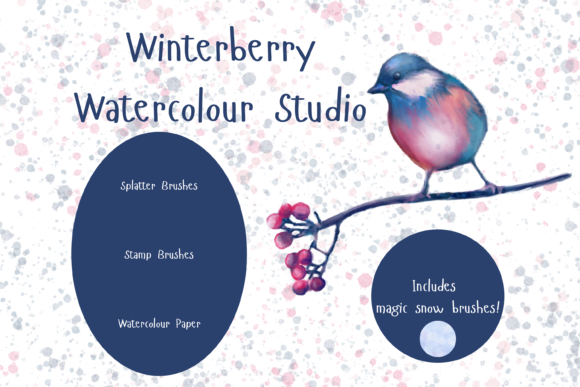
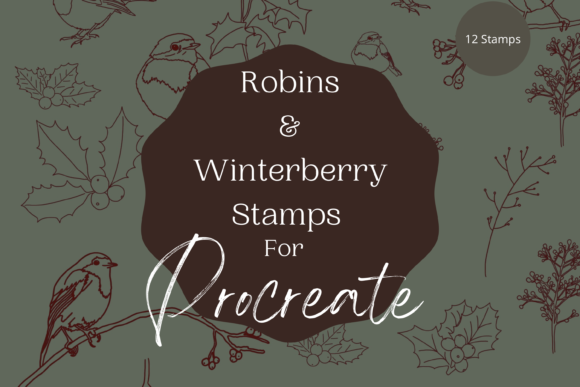
There is a specific kind of magic that happens when digital tools meet the organic feel of hand-drawn art. For many creatives, the holiday season brings a rush of projects ranging from personal greeting cards to commercial product lines. In this landscape, the Procreate Robin Winterberry Stamps offer a unique solution. These are not just generic shapes; they are twelve unique individual digital brushes designed to replicate the delicate, festive botanical aesthetic of winter berries and foliage. Whether you are looking to create seamless wrapping paper or a single piece of wall art, understanding how these instant download hand-drawn digital brushes function can transform your workflow.
At their core, these files are specialized assets that only work within the Procreate app on an iPad. This specificity is crucial for potential users to understand immediately. To utilize them, you must have an Apple Pencil and the Procreate application installed on a compatible iPad. Without this ecosystem, the files remain inaccessible. Once installed, however, they open up a world of flexibility. The brushes can be resized using the built-in brush resize tool or manipulated via the move and resize tool, allowing for infinite variation in composition. They are also fully recolorable, meaning the default reds and greens can shift to match any brand palette or personal preference.
Why Different Creators Care About Botanical Stamps
The value of a digital asset changes depending on who is holding the stylus. What matters to a hobbyist might differ significantly from the priorities of a small business owner. The Procreate Robin Winterberry Stamps bridge these gaps by offering both ease of use for novices and deep customization for professionals.
For beginners and hobbyists, the primary appeal often lies in accessibility and immediate results. Digital illustration can have a steep learning curve, particularly when trying to master watercolor textures or botanical details from scratch. These stamps act as a shortcut to quality. A beginner can create a beautiful holiday card in minutes without needing years of drawing practice. The ability to simply stamp an element, reduce its opacity, and trace over it on additional layers serves as an excellent educational tool. It allows new users to study the structure of the berry clusters and leaves, effectively using the brush as a guide for creating their own watercolor illustration art pieces.
Conversely, professional illustrators and graphic designers often evaluate tools based on flexibility and integration into complex workflows. For this group, the fact that these brushes work well with textures and clipping masks is a significant selling point. A professional might use the winterberry stamps as a base layer, applying complex blending modes or overlaying grainy textures to achieve a specific print-ready look. The priority here is not just speed, but the ability to manipulate the asset until it feels entirely original. The capacity to resize and recolor ensures that the asset can fit into diverse client briefs without looking like a stock template.
Practical Applications Across Industries
The versatility of these digital brushes extends far beyond simple sketches. Because they are designed for both continued digital crafting and printed goods, they serve a wide array of practical needs.
- Greeting Cards and Invitations: This is perhaps the most intuitive use case. The festive nature of the robin and winterberry motif makes it ideal for Christmas cards, winter wedding invitations, or party announcements. Users can arrange the stamps to create borders, corner accents, or central focal points.
- Scrapbooking and Journaling: Digital scrapbookers can use these elements to preserve holiday memories. Since the brushes are resizable, they can be scaled down to fit tiny photo corners or enlarged to serve as background elements in a digital layout.
- Wall Art and Home Decor: Artists creating prints for sale can combine these stamps with typography or other illustrations to create seasonal wall art. The hand-drawn quality adds a warmth that vector graphics sometimes lack.
- Wrapping Paper and Surface Design: By repeating the stamp patterns, creators can design custom wrapping paper. This is particularly valuable for small businesses looking to offer branded packaging during the holidays.
- Print on Demand (POD): Entrepreneurs running POD shops can incorporate these elements into designs for mugs, tote bags, and pillows. The high resolution and scalability of the brushes ensure the artwork remains crisp when printed on various products.
Technical Considerations and Setup
Before diving into creation, it is essential to address the technical requirements to ensure a smooth experience. As mentioned, these are digital brushes exclusive to the Procreate environment. If you are accustomed to desktop software like Photoshop or Illustrator, there is a learning curve involved in switching to the iPad ecosystem. However, the trade-off is often a more intuitive, tactile drawing experience.
The installation process requires a few specific steps. You will need a platform to download the files, such as iCloud, and a program capable of unzipping the files. Once extracted, importing them into Procreate is straightforward, but skipping the unzip step is a common error that prevents the brushes from appearing. Ensuring your iPad and Apple Pencil are paired correctly is also vital for pressure sensitivity, which affects how the stamp interacts with the canvas if you choose to vary the size dynamically.
For those interested in the commercial value of these brushes, it is worth noting how they impact production speed. In a freelance or agency setting, time is money. Having a library of pre-made, high-quality botanical elements allows a designer to mock up concepts rapidly. Instead of spending hours painting individual berries, a designer can focus on composition, color theory, and client communication. This efficiency does not diminish the creativity of the final piece; rather, it reallocates mental energy to higher-level design decisions.
Evaluating Fit for Your Goals
How do you know if the Procreate Robin Winterberry Stamps are right for you? It comes down to aligning the tool with your specific project type and skill level.
If you are an educator teaching digital art, these brushes offer a fantastic way to demonstrate layering techniques. You can show students how to build an image from the background up, using the stamps as a foundation. The "stamp, reduce opacity, paint over" method is a classic teaching technique that demystifies the illustration process.
If you are a marketer or blogger, visual content is king. These assets allow you to create custom headers, social media graphics, or blog post illustrations that stand out from generic stock photography. The unique, hand-drawn aesthetic can help reinforce a personal brand identity that feels authentic and approachable.
However, if you do not own an iPad or have no interest in learning Procreate, these files will not meet your needs. They are not compatible with other software, and attempting to force them into a different workflow will lead to frustration. Similarly, if your goal is to create hyper-realistic 3D renders, these 2D hand-drawn stamps may not align with your stylistic requirements.
Ultimately, the decision rests on your desire for a blend of tradition and technology. These brushes capture the timeless charm of winter botany while leveraging the undo button, infinite color palette, and layering capabilities of modern digital art. Whether you are wrapping a virtual gift, designing a physical product, or simply exploring a new creative hobby, the Procreate Robin Winterberry Stamps provide a robust toolkit for bringing festive visions to life.