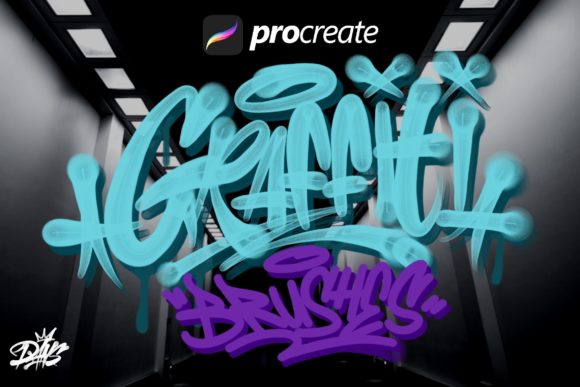
Evaluating Dans Graffiti Brush 1 for Digital Street Art Creation
The transition from physical walls to digital canvases has become a significant trend within the street art community. For artists who have spent years mastering analog techniques, replicating the authentic texture and unpredictability of spray paint on a screen can be challenging. Dans Graffiti Brush 1 represents a specialized toolset designed to bridge this gap. Created by an artist with a deep background in traditional graffiti, this Procreate brush set aims to provide the tactile feel of handmade resources within a digital environment. This article evaluates the utility, benefits, and limitations of this toolset for artists considering a shift to or expansion into digital media.
Understanding the Toolset
Dans Graffiti Brush 1 is a collection of five distinct brushes engineered specifically for use in Procreate on the iPad Pro with an Apple Pencil. Unlike generic texture brushes found in standard libraries, these tools are the result of extensive study into what makes analog graffiti look authentic. The developer focused on capturing specific physical behaviors, such as paint drips, splashes, and the varying pressure dynamics of marker tips and spray cans. The set also includes templates of common graffiti tools, allowing users to incorporate structural elements into their compositions without needing to draw them from scratch.
The core philosophy behind the creation of these brushes was to solve a specific problem: the sterility often associated with digital art. By digitizing handmade resources, the goal is to retain the "human error" and organic flow that characterizes real street art. This approach allows artists to create lettering designs, posters, and flyers that maintain an analog aesthetic while leveraging the efficiency of digital workflows.
Why Artists Consider Digital Graffiti Tools
There are several practical reasons why a graffiti artist might evaluate a product like Dans Graffiti Brush 1. Primarily, digital platforms offer a risk-free environment for experimentation. In the physical world, materials are costly, and mistakes on a wall can be difficult or expensive to rectify. Digital tools allow for unlimited undo actions, layer management, and color testing without wasting paint or surface space.
Furthermore, the demand for digital assets has grown as brands and clients increasingly seek street-art-style graphics for social media, advertising, and merchandise. Artists who traditionally work only on walls may find themselves needing to produce high-resolution files for print or web use. A specialized brush set facilitates this transition, enabling the creation of professional-grade deliverables that still resonate with the culture's visual language.
Key Benefits and Capabilities
- Authentic Texture Replication: The primary advantage of this set is its ability to mimic the behavior of real paint. The inclusion of drip and splash mechanics means that lines do not appear perfectly uniform, which is essential for maintaining credibility in the graffiti genre.
- Workflow Efficiency: With pre-made templates and specialized tips, artists can accelerate the sketching and finalizing phases of a project. This is particularly useful for commercial deadlines where speed is a factor.
- Versatility in Application: While designed for graffiti, the brushes are adaptable for various design tasks. They can be used for bold lettering, background textures, or detailed illustrative work, offering flexibility beyond simple tagging.
- Portability: Combining the iPad Pro with these brushes allows artists to carry a complete studio in a bag, enabling creation anywhere without the logistical hurdles of setting up physical easels or finding legal walls.
Tradeoffs and Considerations
While Dans Graffiti Brush 1 offers significant advantages, it is important to approach it with realistic expectations. Digital tools, no matter how sophisticated, cannot fully replicate the physics of aerosol pressure, wind conditions, or the absorption of paint into different surface materials like brick or concrete. Artists accustomed to the physical resistance of a wall may initially find the glass surface of an iPad lacking in tactile feedback, even with high-quality brushes.
Additionally, the set includes only five brushes. For artists who rely on a vast array of custom caps, nozzles, and markers, this limited selection might feel restrictive. Users may need to supplement this set with other tools or spend time adjusting opacity and flow settings to achieve a wider variety of effects. There is also a learning curve associated with mastering pressure sensitivity on the Apple Pencil to control the intensity of the drips and splashes effectively.
Ideal Use Cases
This toolset is a strong fit for specific types of creators. It is particularly valuable for:
- Analog Artists Transitioning to Digital: Those who want to maintain their existing style without relearning how to draw from scratch will benefit from the familiar stroke dynamics.
- Graphic Designers: Professionals looking to incorporate urban aesthetics into commercial projects, such as event flyers or album covers, can use these brushes to add authentic flair quickly.
- Concept Artists: Individuals who need to visualize large-scale murals before executing them physically can use the templates and brushes to create accurate mockups for client approval.
When to Consider Alternatives
Despite its strengths, Dans Graffiti Brush 1 may not be the optimal choice for everyone. Artists whose primary goal is hyper-realistic 3D rendering or vector-based precision might find raster-based Procreate brushes limiting. In such cases, vector software like Adobe Illustrator, perhaps paired with custom pattern brushes, might offer the scalability and clean lines required for those specific outputs.
Moreover, if an artist requires a massive library containing hundreds of variations for every conceivable cap type or paint effect, a more comprehensive (and potentially more expensive) suite might be necessary. Users who prioritize quantity over the curated, specific "analog touch" of this set should explore broader marketplaces that offer extensive mega-packs.
Making the Decision
Deciding whether to integrate Dans Graffiti Brush 1 into your workflow depends largely on your specific goals. If your objective is to create digital work that honors the imperfections and energy of traditional graffiti while enjoying the convenience of the iPad ecosystem, this toolset aligns well with those needs. It serves as a practical bridge, allowing for the creation of lettering designs and artistic pieces that feel hand-crafted rather than digitally generated.
However, if your work demands absolute photorealism of physical environments or requires vector scalability for massive format printing, you may need to weigh this purchase against other technical solutions. Ultimately, the value of these brushes lies in their ability to streamline the creative process for those who appreciate the intersection of old-school street culture and modern digital technology. By understanding both the capabilities and the inherent limitations of digital emulation, artists can make an informed choice that best supports their artistic vision.